

What size laptop sleeve?
of reading
A 13-inch laptop that floats in its sleeve, or a 15.6-inch one that's a tight fit when closing, is immediately noticeable. If you're wondering what size laptop sleeve to choose, the right approach isn't just to look at the advertised inch size. For a truly protective sleeve, you should primarily consider the actual dimensions of your device.
The most confusing point is that inches correspond to the screen's diagonal, not the PC's external dimensions. Two laptops advertised as 14 inches can have thinner or thicker bezels, a bulkier case, or a more compact chassis. As a result, a 14-inch sleeve might fit one model perfectly but be too snug for another.
What size laptop sleeve should I choose based on measurements?
The surest method is simple: measure the width, depth, and thickness of your closed laptop. This trio determines whether the sleeve will be snug, comfortable, or, on the contrary, ill-fitting.
Take a tape measure or a rigid ruler, then measure from edge to edge on the widest part. Then do the same for the depth, from front to back, and then for the thickness when the laptop is closed. It's best to note the exact dimensions in both inches and centimeters if you're buying from a site that mixes the two units.
A good sleeve should neither compress the laptop nor leave too much space. If it's too tight, you'll wear out the zippers, strain the seams, and lose daily convenience. If it's too big, the PC will move around inside, which reduces protection during transport.
As a general rule, allow for a small margin. About 0.4 to 0.8 inches in width and depth may be sufficient depending on the material's flexibility. For thickness, it all depends on whether the sleeve is thin, padded, or designed as a more structured pouch. A neoprene sleeve often tolerates a slight discrepancy. A rigid or very snug sleeve requires more precision.
Don't rely solely on inches
This is the most common mistake. You read 15 inches on the PC's spec sheet, order a 15-inch sleeve, and then find that the zipper barely closes. This isn't necessarily a product error. It's often a difference between screen size and external dimensions.
A 13-inch MacBook, for example, can have a very compact form factor. Conversely, some entry-level 13 or 14-inch laptops have thicker bezels and take up more space in a sleeve. The same logic applies to 15.6-inch models: some ultrabooks remain thin, while others are thicker due to their cooling system or a more robust casing.
This is why a sleeve labeled 13, 14, or 15.6 inches should always be checked against the advertised internal dimensions. These internal dimensions are more telling than just the size name.
Most common size benchmarks
For an 11 to 12-inch laptop, you're generally looking at a compact size, easy to slip into a bag. A thin sleeve may suffice if you already carry the device in a padded bag.
For a 13 or 14-inch laptop, you're looking at one of the most common sizes. This is also where size differences are most deceptive. Two models that appear similar on paper may require different sleeves depending on their design.
For a 15.6-inch laptop, vigilance is even more important. Many customers think a 15-inch sleeve will fit, whereas a 15.6-inch laptop often needs a little more space, especially if the PC is not an ultra-thin model.
For a 16 or 17-inch laptop, it's best to avoid overly snug sleeves if you frequently transport your device. The weight and bulk require a sleeve that provides good protection without complicating handling.
How do I know if the sleeve fits properly?
A well-fitting sleeve allows you to insert the laptop without forcing it, then remove it easily. Once closed, the laptop should not slide freely from side to side. It should remain held in place, without excessive pressure.
The right fit also depends on your usage. If you only store your laptop at home to protect it from dust, a slightly more generous margin may be suitable. If you carry it every day for work, school, or travel, a more precise sleeve will often be preferable.
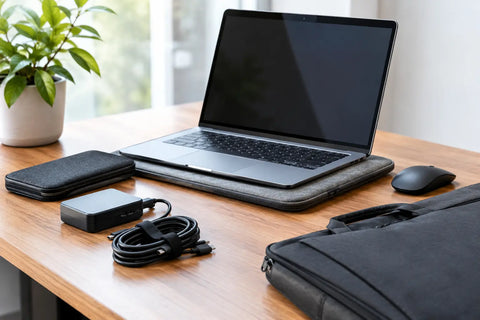
You also need to think about accessories. If you want to slip in a slim mouse, a small charger, or some documents, not all sleeves are designed for this. Some are designed like a second skin. Others offer an external pocket or a slightly more flexible volume. In this case, the size of the sleeve is chosen not only for the PC but for the complete use.
Thin sleeve, padded sleeve, or hard case
The level of protection changes how you choose the size. A thin sleeve is practical, light, and discreet. It's well-suited if your laptop travels in another bag. However, it's unforgiving of dimension errors when the cut is tight.
A padded sleeve provides more reassuring protection against minor bumps, scuffs, and daily wear and tear. It's often a bit more forgiving due to its flexible structure, but its padding also takes up space.
A hard or semi-hard case offers more protection during travel, especially if you frequently transport your laptop. In return, the size choice must be even more precise. Too small, it becomes unusable. Too large, the protective effect decreases because the device moves around inside.
Mistakes to avoid when choosing a sleeve
The first mistake is choosing by guesswork. Many people think they can recognize the right size by eye, especially if their old PC fit into a certain sleeve. However, a few tenths of an inch can change the comfort of use.
The second mistake is forgetting the thickness. A laptop with a reinforced case, bulkier hinges, or a gaming design will be harder to fit than a flat device, even if both share the same screen diagonal.
The third mistake is oversizing "for safety." This seems reassuring, but an oversized sleeve provides less protection against movement, light bumps, and repeated rubbing.
The fourth mistake is not considering the material. A flexible sleeve does not behave the same way as a structured sleeve. The same computer may fit into one but not the other, even if the label shows the same size.
The specific case of MacBooks, ultrabooks, and gaming laptops
Not all laptops fill space in the same way. MacBooks and ultrabooks are often thinner and more compact. They can sometimes fit into a sleeve advertised for an equivalent size, with a more snug and elegant fit.
Gaming laptops, on the other hand, are often thicker, wider, and heavier. Even with the same screen size, they require a more generous sleeve or a model specifically designed for a bulkier chassis. This is a point not to be overlooked if you are looking for a true protective sleeve and not just a storage pouch.
The right question to ask yourself before buying
Ultimately, the real question isn't just what size laptop sleeve to buy, but how you use your laptop every day. Do you transport it often? Do you slip it into a backpack? Do you want an elegant sleeve for meetings, or a thicker sleeve for daily commutes?
From there, the choice becomes simpler. Measure your closed device, compare it with the internal dimensions of the sleeve, and then allow a small margin appropriate for the type of protection you're looking for. This is the most reliable solution to avoid returns, unpleasant surprises, and premature wear.
At 1001 Housses, the idea remains the same regardless of the object to be protected: an effective sleeve is a suitable sleeve. For a laptop, a few well-taken measurements are always better than an approximate purchase.
If you hesitate between two sizes, choose the sleeve that first matches the actual dimensions of your PC, then your usage. A good sleeve is hardly noticeable in everyday life - except on the day it saves you from a shock, a scratch, or unnecessary replacement.